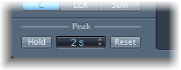

Surround MultiMeter offers the following Peak parameters:
Surround MultiMeter Peak parameters
Hold button: Turn on peak hold for all metering tools in Surround MultiMeter. This is displayed as follows:
Analyzer: A small yellow segment above each level bar indicates the most recent peak level.
Goniometer: All illuminated pixels are held during a peak hold.
Level Meter: A small yellow segment above each level bar indicates the most recent peak level.
Balance/Correlation Meter: The horizontal area around the white correlation indicator denotes phase correlation deviations in real time, in both directions.
Note: This meter must be manually opened by clicking the Balance/Correlation button.
Hold Time pop-up menu: Choose the hold time for all metering tools. Choose 2, 4, or 6 seconds—or infinite.
Note: The (peak) Hold button must be turned on for the selected time value to have an effect.
Reset button: Reset the peak hold segments of all metering tools.
Inter Sample Peak Detection checkbox (Extended Parameters area): Select to detect inter-sample peaks in the signal.