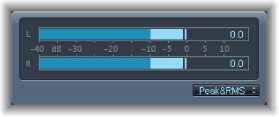

Level Meter displays the current signal level on a decibel scale. The signal level for each channel is represented by a blue bar. When the level exceeds 0 dB, the portion of the bar to the right of the 0 dB point turns red.
Stereo Level Meter instances show independent left and right bars, whereas mono instances display a single bar.
Surround Level Meter instances display a bar for each channel—in a vertical, rather than horizontal, orientation.
The current peak values are displayed numerically, superimposed over the graphic display. You can reset these values by clicking in the display.
Level Meter parameters
Display type pop-up menu: Choose a display setting using Peak, RMS, Peak & RMS, Inter Sample Peak, or Inter Sample Peak & RMS characteristics.
The Inter Sample Peak options display inter-sample values.
RMS levels appear as dark blue bars. Peak levels appear as light blue bars. You can also choose to view both Peak and RMS levels simultaneously.
Peak and RMS levels
The peak value is the highest level that the signal will reach. The RMS (root mean square) value is the effective value of the total signal. In other words, it is a measurement of the continuous power of the signal.
Human hearing is optimized for capturing continuous signals, making our ears RMS instruments, not peak reading instruments. Therefore, using RMS meters makes sense most of the time. Alternatively, you can use both RMS and Peak meters.