
Each channel strip in Logic Pro allows you to use a special version of the Pan knob, known as the Binaural Panner. This is a psychoacoustic processor that can simulate arbitrary sound source positions—including up and down information—when fed a standard stereo signal.
The output signal that results when you use Binaural Panner is best suited for headphone playback. You can, however, use the integrated conditioning of the Binaural Panner to ensure a neutral sound that is suitable for speaker playback as well as headphone playback.
For more information about using Binaural Panner with the Binaural Post-Processing plug-in, see the Logic Pro X Help.
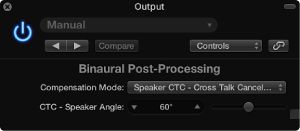
Binaural Post-Processing parameters
Compensation Mode pop-up menu: Choose the type of processing applied for different playback systems.
Headphone FF—optimized for front direction: For headphone playback, utilizing free-field compensation. In this mode, sound sources placed in front of the listening position have neutral sound characteristics.
Headphone HB—optimized for horizontal directions: For headphone playback, optimized to deliver the most neutral sound for sources placed on, or close to, the horizontal plane.
Headphone DF—averaged over all directions: For headphone playback, utilizing diffuse-field compensation. In this mode, the sound, on average, is most neutral for arbitrarily placed, or moved, sources.
Speaker CTC—Cross Talk Cancelation: For speaker playback, allowing you to play back binaurally panned signals through stereo loudspeakers. Good spatial reproduction is restricted to a limited range of listening positions, on the symmetrical plane, between the speakers.
CTC—Speaker Angle field and slider: Set an angle that matches the physical angle of your stereo speakers, relative to the listening position.
Note: This parameter is available only when the Speaker CTC compensation mode is chosen.
Turn off the integrated conditioning.
Route the output of all binaurally panned signals to an aux channel.
Insert a Binaural Post-Processing plug-in into the aux channel.
Apply diffuse-field compensation to all Binaural Panner outputs at once.
Using multiple Binaural Panners on several channels is simpler to manage than using a single Binaural Panner on each channel; it also sounds better and reduces computer processing requirements.