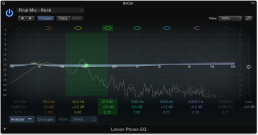

The central area of the Linear Phase EQ window includes the graphic display and parameters for shaping each EQ band. The master Gain slider is shown at the right. The Analyzer and Q Couple controls are shown at the lower left.
Linear Phase EQ parameters
Band On/Off buttons: Turn the corresponding band on or off. Each colored button indicates the filter type:
Band 1 is a highpass filter.
Band 2 is a low shelving filter.
Bands 3 through 6 are parametric bell filters.
Band 7 is a high shelving filter.
Band 8 is a lowpass filter.
Graphic display: Shows the current curve of each EQ band. The scale is shown in dB.The color of each band matches the corresponding button above the display. Each colored band (and corresponding Frequency, Gain, and Q field) is highlighted as you move the mouse pointer across it. Click a curve line segment, the (center frequency) handle, or in the colored space between the zero line and EQ curve to highlight and select a band for editing.
Tip: Hold Command while performing any of the operations below to limit dragging to vertical or horizontal movement.
Drag anywhere in the colored band to adjust gain and the center frequency.
Drag the vertical lines that encompass the band to adjust the Q (bandwidth) only.
Drag the horizontal line in the band to adjust the gain only. If Q-Coupling is enabled both the gain and bandwidth are adjusted.
Drag the intersection of vertical and horizontal lines to adjust the gain and Q simultaneously.
Drag the handle to adjust the center frequency only.
Note: Horizontally dragging the frequency handle in band 1 and band 8 adjusts both the frequency and Q.
Hold down Option-Command to adjust the Q and center frequency simultaneously.
Frequency fields: Adjust the frequency of each band.
Gain/Slope fields: Set the amount of gain for each band. For bands 1 and 8, this changes the slope of the filter.
Q fields: Adjust the Q factor or resonance of the effected range around the center frequency in each band.
Note: The Q parameter of band 1 and band 8 has no effect when the slope is set to 6 dB/Oct. When the Q parameter is set to an extremely high value, such as 100, these filters affect only a very narrow frequency band and can be used as notch filters.
Master Gain slider and field: Set the overall output level of the signal. Use it after boosting or cutting individual frequency bands.
Analyzer button: Turn the Analyzer on or off.
Analyzer (Pre/Post) button: Set to display the frequency curve before or after EQ is applied, when Analyzer mode is active. See Linear Phase EQ Analyzer.
Q-Couple button: Turn on Gain-Q coupling, which automatically adjusts the Q (bandwidth) when you raise or lower the gain on any EQ band. This preserves the perceived bandwidth of the bell curve. See Linear Phase EQ extended parameters.
Processing pop-up menu: Choose to process both sides of a stereo signal, the Left Only, Right Only, Mid Only, or Side Only signal. See Linear Phase EQ use tips for information on using Linear Phase EQ with Middle-Side recordings.