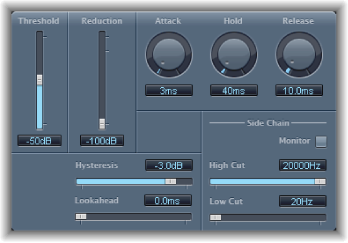

Noise Gate is commonly used to suppress unwanted noise that is audible when the audio signal is at a low level. You can use it to remove background noise, crosstalk from other signal sources, and low-level hum, among other uses.
Noise Gate works by allowing signals above the threshold level to pass unimpeded, while reducing signals below the threshold level. This effectively removes lower-level parts of the signal, while allowing the desired parts of the audio to pass.
Noise Gate parameters
Threshold slider and field: Set the threshold level. Signals that fall below the threshold are reduced in level.
Reduction slider and field: Set the amount of signal reduction.
Attack knob and field: Set the time it takes to fully open the gate after the signal exceeds the threshold.
Hold knob and field: Set the time the gate remains open after the signal falls below the threshold.
Release knob and field: Set the time it takes to reach maximum attenuation after the signal falls below the threshold.
Hysteresis slider and field: Set the difference (in decibels) between the threshold values that open and close the gate. This prevents the gate from rapidly opening and closing when the input signal level is close to the threshold level.
Lookahead slider and field: Control how far ahead Noise Gate analyzes the incoming signal, allowing the effect to respond more quickly to peak levels.
Monitor button: Turn on to hear the side-chain signal, including the effect of the High Cut and Low Cut filters.
High Cut slider and field: Set the upper cutoff frequency for the side-chain signal.
Low Cut slider and field: Set the lower cutoff frequency for the side-chain signal.
Note: When no external side chain is selected, the input signal is used as the side chain.