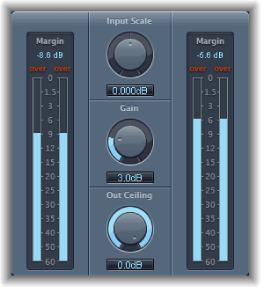

Adaptive Limiter is a versatile tool for controlling the perceived loudness of sounds. It works by rounding and smoothing peaks in the signal, producing an effect similar to an analog amplifier being driven hard. Like an amplifier, it can slightly color the sound of the signal. You can use Adaptive Limiter to achieve maximum gain, without introducing unwanted distortion and clipping, which can occur when the signal exceeds 0 dBFS.
Adaptive Limiter is typically used on the final mix, where it can be placed after a compressor, such as Multipressor, and before a final gain control, resulting in a mix of maximum loudness. Adaptive Limiter can produce a louder-sounding mix than can be achieved by normalizing the signal.
Note: Using Adaptive Limiter adds latency when the Lookahead parameter is active. The effect is typically used for mixing and mastering previously recorded tracks, not while recording. You should bypass Adaptive Limiter while recording.
Adaptive Limiter parameters
Input meters: Show input levels in real time.The Margin field shows the highest input level. You can reset the Margin field by clicking it.
Input Scale knob and field: Scale the input level. Scaling is useful for handling very high-level or low-level input signals. It “squeezes” the higher and lower signal levels into a range that allows the Gain knob to work effectively. Avoid input levels above 0 dBFS, which can result in unwanted distortion.
Gain knob and field: Set the amount of gain after input scaling.
Out Ceiling knob and field: Set the maximum output level, or ceiling. The signal will not rise above this.
Output meters: Show output levels of the limited signal. The Margin field shows the highest output level. You can reset the Margin field by clicking it.
Lookahead field and slider (Extended Parameters area): Drag to adjust the playback buffer size (how far in the future the file is analyzed for peaks).
Remove DC checkbox (Extended Parameters area): Select to activate a highpass filter that removes direct current (DC) from the signal. DC can be introduced by lower-quality audio hardware.
Inter Sample Peak Detection checkbox (Extended Parameters area): Select to detect inter-sample peaks in the signal.