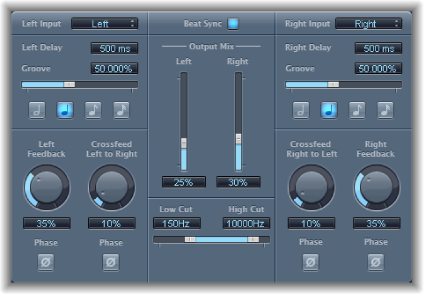

Stereo Delay lets you set the Delay, Feedback, and Mix parameters separately for the left and right channels. The Crossfeed knob (for each stereo side) sets the feedback intensity level of each signal being routed to the opposite stereo side. You can use Stereo Delay on mono tracks or busses when you want to create independent delays for the two stereo sides.
Note: If you use Stereo Delay on mono channel strips, the track or bus will have two channels from the point of insertion—all Insert slots after the chosen slot will be stereo.
The parameters for the left and right delays are identical. The descriptions below apply to both channels. Global parameters are described after the channel parameters.
Channel parameters
Input pop-up menu: Choose the input signal for the two stereo sides. Options include Off, Left, Right, L + R, and L − R.
Delay Time field: Set the delay time in milliseconds. (The parameter is dimmed when you synchronize the delay time with the project tempo.)
Groove slider and field: Set the proximity of every second delay repeat to the absolute grid position. Put another way, set how close every second delay repeat is.
Note buttons: Set the grid resolution for the delay time.
Feedback knob and field: Set the amount of feedback for the left and right delay signals.
Crossfeed Left to Right (Right to Left) knob and field: Transfer the feedback signal of the left channel to the right channel, and vice versa.
Feedback Phase button: Invert the phase of the corresponding channel’s feedback signal.
Crossfeed Phase button: Invert the phase of the crossfed feedback signals.
Global and Output parameters
Beat Sync button: Synchronize delay repeats to the project tempo.
Output Mix sliders and fields: Independently control the level of the left and right channel signals.
Low/High Cut sliders and fields: Cut frequencies below the Low Cut value and above the High Cut value from the source signal.