The Arpeggiator keyboard parameters let you split your keyboard into zones that are used for standard note playback, arpeggio note triggering, and remote control of the Arpeggiator plug-in parameters.
The default keyboard range spans the 88 notes from C0 to C7.
Click the keyboard, then drag left or right to reveal additional octaves, in one octave increments.
By default, the complete MIDI key range (0–127) is used solely for arpeggiating. You can split your MIDI keyboard into several zones to control Arpeggiator plug-in functions with MIDI keys. The onscreen keyboard reflects the split layout.
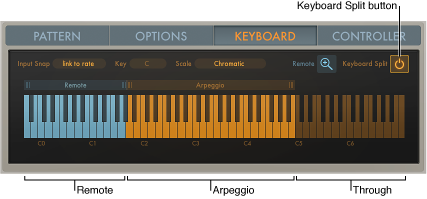
To divide your MIDI keyboard range into three zones, click the Keyboard Split button.
Arpeggio: Notes played in this keyboard zone are arpeggiated.
Remote: Notes played in this zone trigger an Arpeggiator function.
Through: Notes are passed through the Arpeggiator plug-in unprocessed.This zone covers all keys outside the two zones listed above.
Drag the handles above each end of the Arpeggio or Remote zone to resize it.
Click the name of either the Arpeggio or Remote zone and drag to the left or right. If the zones are adjacent, both zones are moved.
The Arpeggio and Remote zones can swap places so that the Remote zone sits above the Arpeggio zone or vice versa, but the two zones cannot overlap.
Most Arpeggiator parameters can be remote controlled using a MIDI keyboard. By default, only a few Remote commands are available. You can resize the Remote zone to make more commands available.

You must first click the Keyboard Split button to display the Remote (Key editor) button.
The type and number of available remote keys is determined by the Remote zone range. Keys outside this range are dimmed and assigned functions cannot be remote controlled with a MIDI keyboard.
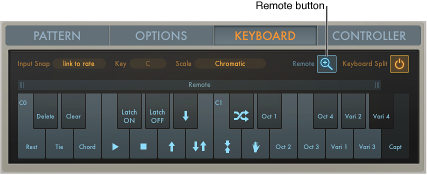
Click the Remote button to open the Remote Key editor window.
A zoomed-in keyboard is displayed, with each key labeled according to its assigned function. Click the Remote button a second time to close the Remote Key editor window. You can also click the Keyboard Split button to exit the Remote Key editor window.
Drag the left or right border of the range bar above the Remote Key editor keyboard to resize the Remote zone.