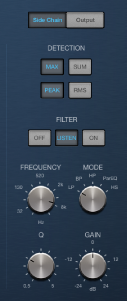

Compressor side chain parameters are shown to the right when the Side Chain button is active.
Note: Not all parameters listed are available in each Compressor model.
Compressor sidechain parameters
Detection buttons: Choose the way stereo sidechain signals are handled at the sidechain input.
Max button: If either of the stereo channels exceeds or falls below the threshold, both channels are compressed.
Sum button: The combined level of both channels must exceed the threshold before compression occurs.
Peak/RMS buttons: These are used in conjunction with the Max and Sum buttons. Choose Peak or RMS to determine whether signal peaks or a signal average is used for detection. These can help with avoiding artifacts such as clicks in the processed signal, dependent on the type of audio material and parameter settings (notably Attack).
Filter buttons: Turn the filter on or off. Turn on Listen to monitor the sidechain signal.
Filter mode knob: Choose the type of filter used to process the incoming side chain signal. Filtering the sidechain input signal can enhance the precision of trigger signals, resulting in more surgical compression. The choices are LP (lowpass), BP (bandpass), HP (highpass), ParEQ (parametric), and HS (high shelving).
Frequency knob and field: Set the center frequency for the side-chain filter.
Q knob and field: Set the width of the frequency band affected by the side-chain filter.
Gain knob and field: Set the amount of gain applied to the side-chain signal.