
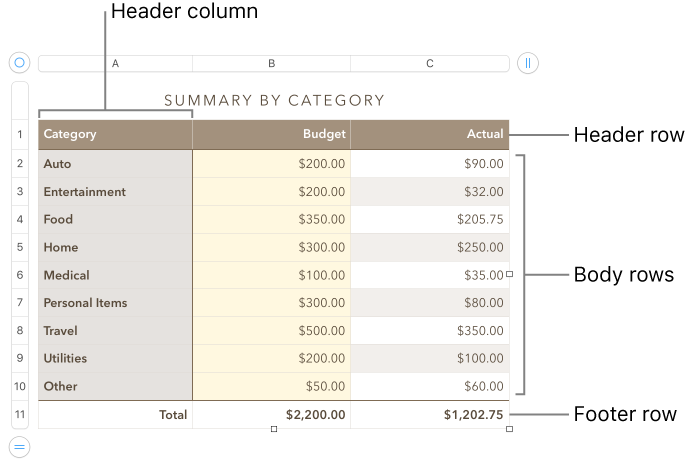
You can add, delete, and rearrange rows and columns in a table. There are three types of rows and columns:
Body rows and columns contain the table data.
Header rows and columns (if any) appear at the top and left side of the table. They usually have a different background color from the body rows, and they’re typically used to identify what the row or column contains.
Footer rows (if any) appear at the bottom of a table, and they can have a different background color from the body rows.
Click the table, then do any of the following:
Add or remove columns on the right side of the table: Click  in the top-right corner of the table, then click an arrow to increase or decrease the number of columns.
Add or remove rows on the bottom of the table: Click  in the bottom-left corner of the table, then click an arrow to increase or decrease the number of rows.
Insert a row or column anywhere in the table: Control-click a cell, then choose where you want to add the row or column (above, below, before, or after the selected cell).
You can also move the pointer over the number or letter for the row or column next to where you want to add, click the down arrow, then choose where to add the row or column.
Delete a row or column anywhere in the table: Control-click a cell in the row or column you want to delete, then choose Delete Row or Delete Column.
You can also move the pointer over the number or letter for the row or column you want to delete, click the down arrow, then choose Delete Row or Delete Column.
Insert multiple rows or columns at once: Anywhere in the table, select a number of rows or columns equal to the number of rows or columns you want to insert, click the arrow next to one of the selected row numbers or column letters, then choose Add Rows Above or Add Rows Below (or Add Columns Before or Add Columns After).
Delete multiple rows or columns at once: Command-click the rows or columns, click the arrow, then choose Delete Selected Rows or Delete Selected Columns.
Adding header rows, header columns, and footer rows converts existing rows or columns to headers or footers. For example, if you have data in the first row of a table and you add a header row, the first row is converted to a header that contains the same data. Data in header cells isn’t used in calculations.
Click the table, then in the Format  sidebar, click the Table tab.
Click the pop-up menus below Headers & Footers, then choose the number of header rows, header columns, or footer rows you want.