
You can collaborate with others in real time by sharing a link to your Keynote presentation. Since shared presentations and any changes to them are saved in iCloud, people working in the presentation can see the changes as they’re made.
As the owner of the presentation, you control who has access to it, and what they can do:
Presentation access: You can send a presentation link that anyone can use to open the presentation. Or, you can invite specific people, who must sign in to iCloud with their Apple ID to open the presentation.
Editing permission: You can choose whether others can make changes to the presentation or only view it.
You can change access and permission settings or stop sharing a presentation at any time.
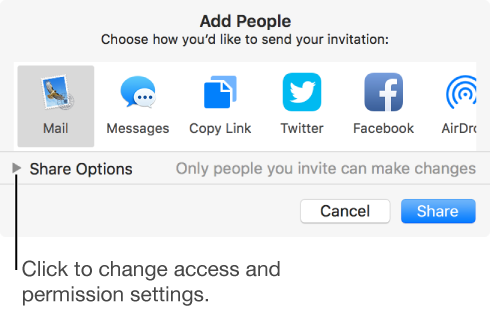
To invite others to collaborate on a presentation, you must be signed in to iCloud and have iCloud Drive turned on.
If you invite only specific people to collaborate on your presentation, they must be signed in to iCloud to view or edit the presentation. If you invite someone using an email address or phone number that isn’t associated with their Apple ID, the person won’t be able to accept the invitation until they add the email address or phone number to their Apple ID. Instructions are provided when they tap or click the link in the invitation.
To view or edit a shared presentation, people you share with need any of the following:
A Mac with macOS Sierra 10.12 or later and Keynote 7.2 or later installed. They must also be signed in to iCloud and have iCloud Drive turned on.
An iOS device with iOS 10 and Keynote 3.2 or later installed. They must also be signed in to iCloud and have iCloud Drive turned on.
A Mac or Windows computer with a supported browser.
Anyone with an Android device, or an iOS device without iOS 10 and Keynote 3.2 or later, can view the presentation but not edit it.
Note: Not all Keynote features are available for a presentation that’s shared. See this Apple Support article for information.