Check spelling

You can have Keynote check spelling while you type and correct mistakes automatically. You can also have Keynote check grammar and add terms to the dictionary so they’re not marked as misspellings.

If you want to check spelling in a different language, first change the language of the dictionary.

Check and correct spelling and grammar

While you’re working in a presentation, do any of the following:

Use autocorrection

When your spelling is checked automatically, misspelled words are underlined in red, and suggested corrections are shown.

If you don’t see autocorrect suggestions, make sure autocorrection is turned on. Choose Edit > Spelling and Grammar > Correct Spelling Automatically (it’s on when there’s a checkmark next to it).

Do any of the following:

Turn off autocorrect

Add and remove words from the spelling dictionary

Do one of the following:

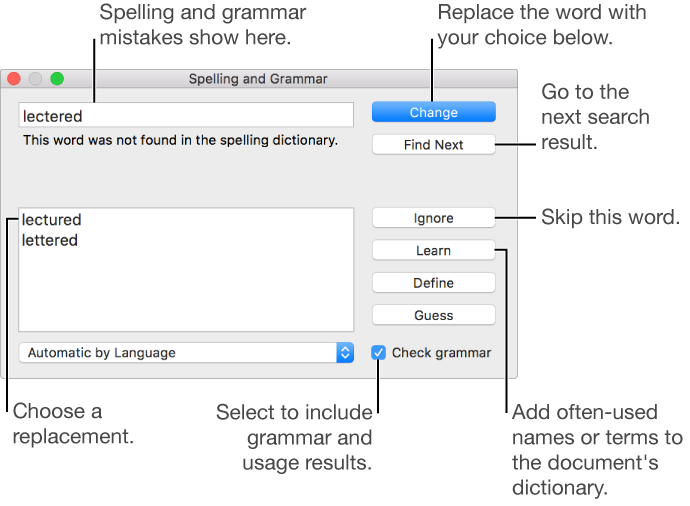
Use the Spelling and Grammar window

You can open the Spelling and Grammar window to manage spelling and grammar in your presentation, and to check just a portion of your presentation.

To learn about finding and replacing text, see Find and replace text.

Set up spell checking for multiple languages

In System Preferences, you can set up your Mac to automatically check spelling for different languages.

  1. Open System Preferences (from the Apple menu at the top-left corner of your screen).

  2. Click Keyboard, then click Text at the top of the window.

  3. Click the Spelling pop-up menu, then choose Set Up at the bottom of the menu.

  4. Do any of the following:

    • Drag the languages in the list into the order you want them checked.

    • Select the checkbox next to languages you want to be checked.

    • If you have a dictionary file you want to use, copy it to the Spelling folder in your Library folder.

  5. Click Done.

  6. Click the Spelling pop-up menu again, then choose Automatic by Language.

  7. Close the keyboard preferences window.

You can also choose a language for spell checking in the Spelling and Grammar window. Choose Edit > Spelling and Grammar > Show Spelling and Grammar. Click the pop-up menu at the bottom of the window, then choose a language.

See also
Look up words
Find and replace text
Use text substitutions