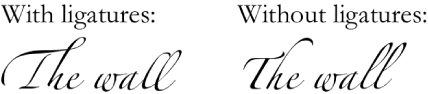

Some fonts include ligatures, a decorative joining of two characters to form a single typographic character. You can use ligatures if the font you’re using supports them.
Select the text you want to change, or select a text box if you want to change all the text it contains.
In the Text pane of the Format inspector, click the Style button.
In the Font section, click  , then choose an item from the Ligatures pop-up menu.
Use Default: Uses the ligature settings specified in the Typography window for the font you’re using.
To open the Typography window, choose Format > Font > Show Fonts (from the Format window at the top of your computer screen).
Use None: Uses regular spacing with no ligatures for the font.
Use All: Uses all available ligatures for the font.
To remove ligatures from selected text, choose Use None from the Ligatures pop-up menu.