
iTunes can create playlists based on rules you specify, and then update these playlists automatically as your library changes.
For example, you could create a Smart Playlist that’s no more than 5 gigabytes (GB) in size and includes your most highly rated jazz songs. Or you could create a Smart Playlist of songs by a particular artist. When you import a new CD by that artist, the songs are added automatically to the Smart Playlist.
If you want to create more complex rules—for example, with some criteria matching all rules and others matching any—you can create sets of rules, or “nested” rules. You can have up to five levels of nesting.
A Smart Playlist has the Smart Playlist icon  next to it.
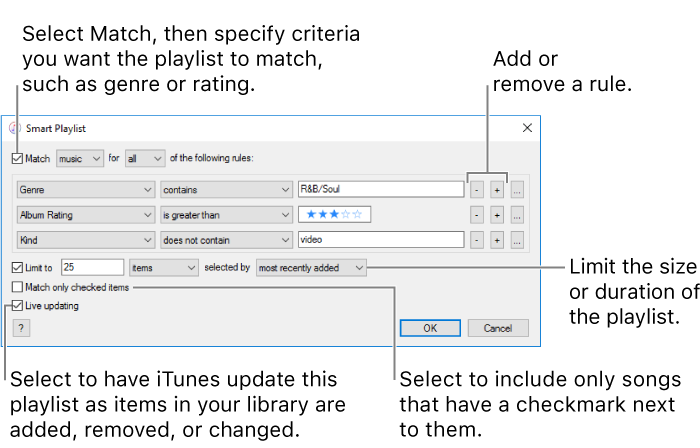
Choose File > New > Smart Playlist.
Specify your rules.
View your Smart Playlists: Choose Music from the pop-up menu at the top left, then click the playlist you want to view in the sidebar on the left.
Change a Smart Playlist: Select the playlist, then click Edit Rules.
Remove a Smart Playlist: Select the playlist, then press the Delete key.