
Immersive audio source must meet the following requirements.
Dolby Atmos audio files generated from mono or stereo mixes are not allowed. Specifically:
A Dolby Atmos track must be created from multitracks or stems created from multitracks.
Upmixing from a stereo release is not allowed.
Extracting stems (“de-mixing”) from a stereo release is not allowed.
A Dolby Atmos track consisting only of a stereo mix placed in the sound field with added ambience or reverb is not allowed.
Provide the Dolby Atmos file as a Broadcast Wave Format Audio Definition Model (BWF ADM) file.
All tracks within a project must be at the same frame rate.
All audio must be 24-bit linear pulse code modulation (LPCM) audio at 48 kHz or 96 kHz. Note: 96 kHz Atmos audio is converted to 48 kHz for output.
You must conform and sync the Atmos files with the stereo reference files for the same project.
The integrated loudness value must not exceed -18 LKFS, measured per ITU-R BS. 1770-4.
True-peak level must not exceed -1 dB TP, measured per ITU-R BS. 1770-4.
Full-frequency content must not be present in the Low-Frequency Effects (LFE) channel of the BWF ADM.
For albums where gapless playback is intended between tracks:
Each album track must be delivered as an individual BWF ADM file.
Each track boundary must be no more than 0.5 seconds earlier or later than the same track boundary in the corresponding stereo deliverable. Half a second is 24,000 samples at 48 kHz, and 48,000 samples at 96 kHz.
A difference of 0.5 seconds or less (≤24,000 samples at 48 kHz or ≤48,000 samples at 96 kHz) is considered acceptable and will PASS.
A difference greater than 0.5 seconds (>24,000 samples at 48 kHz or >48,000 samples at 96 kHz) triggers a WARNING, flagging the delivery for review without blocking ingestion.
There must be no additional silence at the end of each track when compared to the same track from the corresponding stereo deliverable.
Note: Immersive audio that does not meet the requirements may be removed from Apple Music.
Note: 5.1 and 7.1 audio files generated from stereo mixes are not allowed. Upmixing from 5.1 to 7.1 is not allowed. The 5.1 and 7.1 audio files must be delivered according to the guidelines below.
Audio files must be provided as LPCM in .mov containers with channel assignments.
Deliver files at 48 kHz or 96 kHz with 16-bit or 24-bit resolution.
The integrated loudness value must not exceed -18 LKFS, measured per ITU-R BS. 1770-4.
True-peak level must not exceed -1 dB TP, measured per ITU-R BS. 1770-4.
You must conform and sync the deliverables with the stereo reference files for the same project.
The QuickTime .mov file extension is expected for immersive 5.1 and 7.1 audio content.
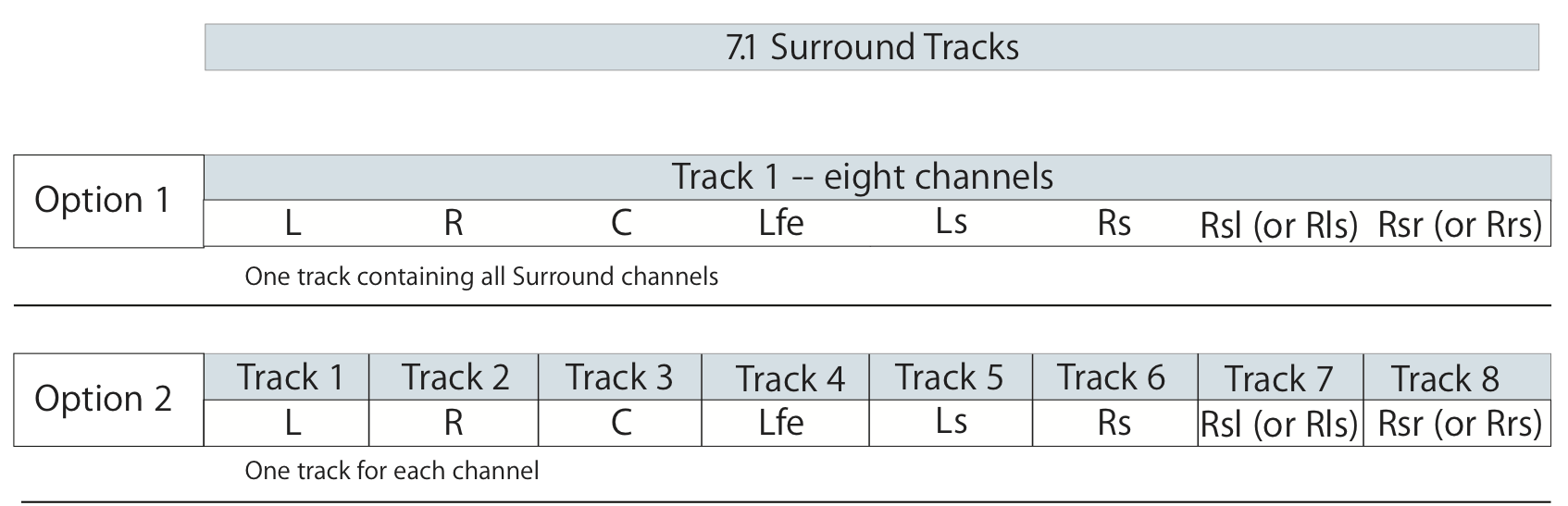
For 7.1 surround audio, each audio channel must have an assignment, which must match one of the options in the table below. Option 1 shows one track with all eight channels and Option 2 shows one track for each channel. Note that “Rsl” (Rear Surround Left) can also be represented by “Rls” (Rear Left Surround).
For 5.1 surround audio, the channel assignments must match one of the options in the table below. For Option 1 (one track with all six channels), the order of the channel assignments can vary as noted in Option 1a, 1b, 1c, and 1d.
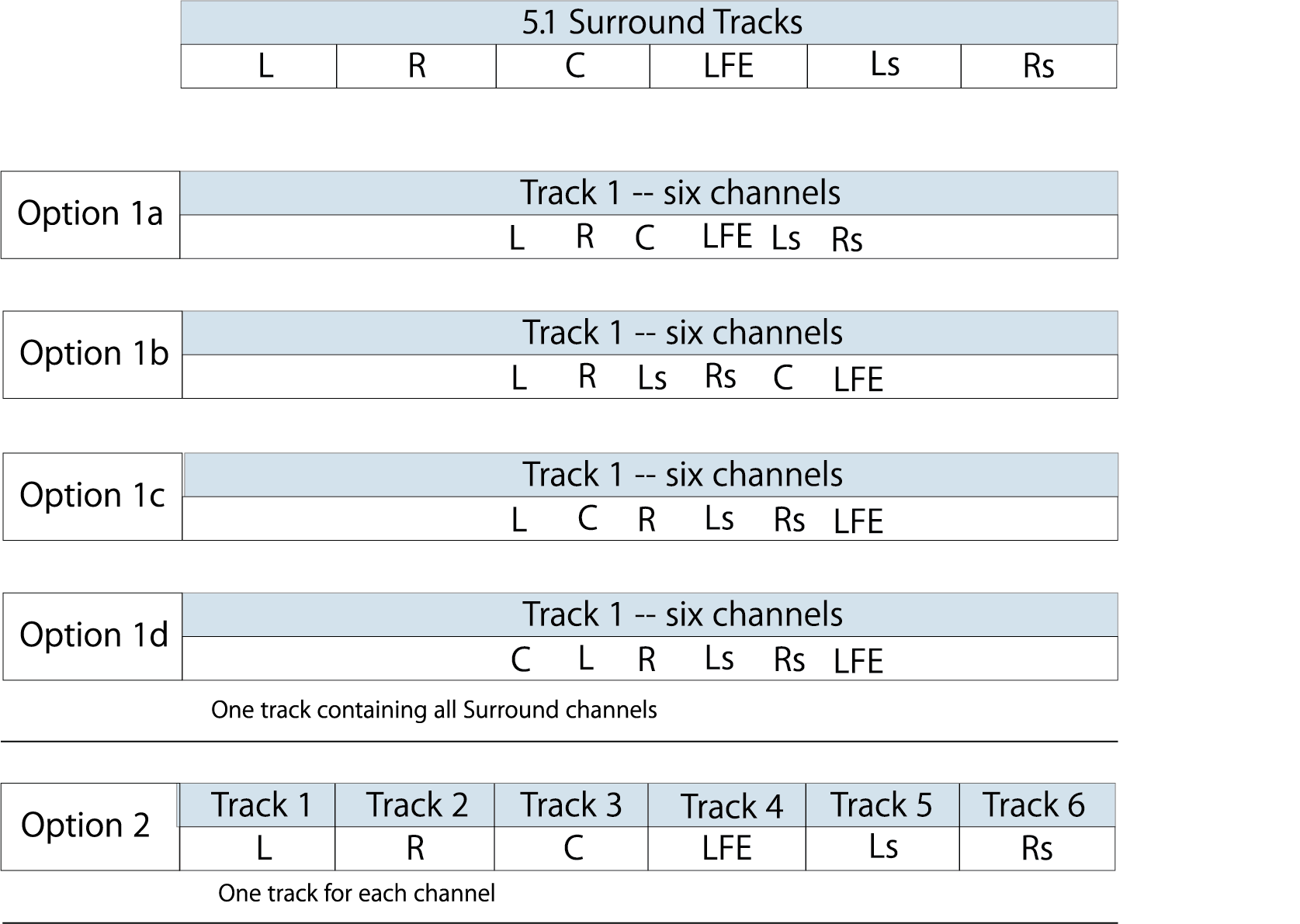
For all stereo tracks in all options listed, the channel assignments can be indicated using L and R, or Lt and Rt, but not L and Rt, or R and Lt.
Refer to Audio Channel Assignments for instructions on applying audio channel assignments and label descriptions.
Keep the following in mind when delivering immersive audio:
On initial delivery, you must deliver a data file with the role audio.2_0 containing the 2.0 stereo audio source unless you instruct Apple to downmix, using the audio.transform_to.2_0 attribute.
Only two audio sources per track (one stereo, one immersive) are allowed.
You cannot deliver two immersive audio sources or two stereo sources for the same track.
A single data file containing both 2.0 stereo source and 5.1 or 7.1 immersive source is not supported.
The difference between the most recently delivered (new or update) stereo source and immersive source durations must be less than or equal to 50 milliseconds.
All tracks in an album should be at same frame rate.