 to see sharing and other options. The options vary depending on the app you’re using.
In many apps, you can tap Share or to see sharing and other options. The options vary depending on the app you’re using.
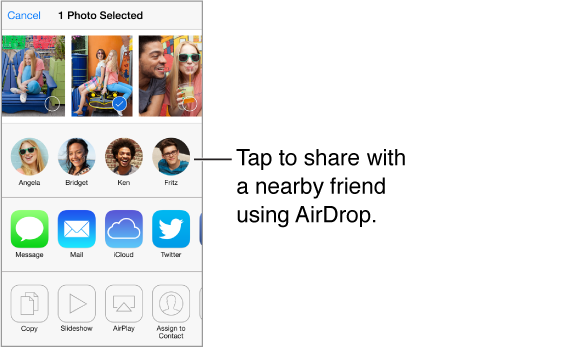
AirDrop lets you share your photos, videos, interesting websites, locations, and other items wirelessly with other nearby iOS 7 devices that support AirDrop. AirDrop requires an iCloud account, and transfers info using Wi-Fi and Bluetooth. You must be on the same Wi-Fi network, or within approximately 30 feet (10 meters) of the other device. Transfers are encrypted for security.
Share an item using AirDrop. Tap Share or , then tap AirDrop and tap the name of a nearby AirDrop user. AirDrop is also available in Control Center—just swipe up from the bottom edge of the screen.
Receive AirDrop items from others. Swipe up from the bottom edge of the screen to open Control Center. Tap AirDrop, then choose to receive items from Contacts only or from Everyone. You can accept or decline.
Add photo or video to a shared stream. Tap iCloud (a sharing option in the Photos app), choose a stream (or create a new one), then tap Post.
Use Twitter, Facebook, Flickr, or Vimeo. Sign in to your account in Settings. The Twitter, Facebook, Flickr, and Vimeo sharing buttons take you to the appropriate setting if you’re not yet signed in.
Note: While you’re composing a tweet, the number in the lower-right corner shows the number of characters remaining. Attachments use some of a tweet’s 140 characters.