Control playback. Tap a song to play it and show the player. Tap the player to show the Now Playing screen, where you can do the following:
Tap to skip to the next song.
Tap to return to the song’s beginning.
Double-tap to play the previous song in an album or playlist.
Skip to any point in a song. Drag the playhead.
Quickly navigate to the album. Tap the track, artist, or album name in Now Playing.
Hide Now Playing. Tap at the top of the Now Playing screen.
Share music. Tap , then tap Share Song.
Shuffle. Swipe up, then tap to play your songs in random order. Tap again to turn off shuffle.
When viewing the contents of a playlist or album, tap Shuffle All.
Repeat. Swipe up, then tap to repeat an album or playlist. Double-tap to repeat a single song.
Add the song to your library. Tap .
See lyrics. Swipe up to see Lyrics, then tap Show to see them. Tap Hide to hide them.
Access additional options. Tap .
See what’s up next. Swipe up. Tap a song to play it and the songs that follow. Drag to reorder the list.
Get audio controls from the Lock screen or when using another app. Swipe up from the bottom edge of the screen to open Control Center, then swipe left. See Control Center.
Stream music to a Bluetooth or AirPlay-enabled device. Tap in Now Playing, then choose a device. See Bluetooth devices and AirPlay Mirroring.
 to skip to the next song.
 to return to the song’s beginning.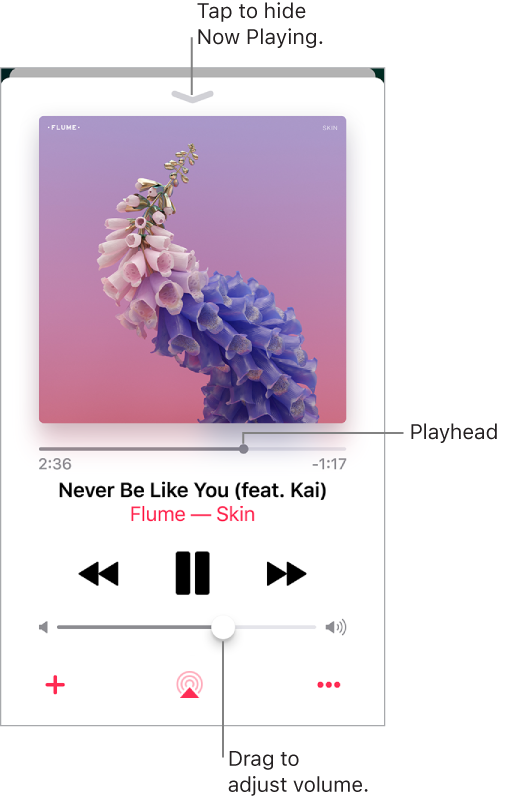
 at the top of the Now Playing screen.
 ,
, to play your songs in random order. Tap again to turn off shuffle.
 to repeat an album or playlist. Double-tap
  .
. to reorder the list.
 in Now Playing, then choose a device. See