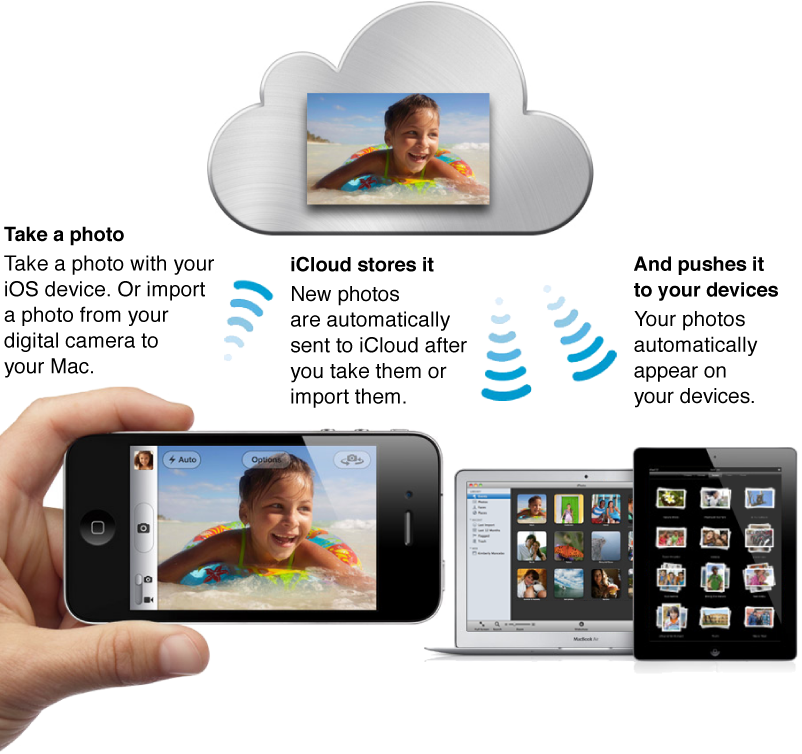

My Photo Stream is the iCloud feature that uploads and stores the last 30 days of your photos and automatically pushes them to all your iOS devices and computers. My Photo Stream lets you view all your recent photos on all your devices without having to sync—all you have to do is turn it on.
Note: You must have an iCloud account to use My Photo Stream. iCloud requires OS X v10.7.2 or later. For more information, see Turn on My Photo Stream in iPhoto.
Here’s how My Photo Stream works:
First, turn on My Photo Stream on any device that you want to be part of your photo stream.
Next, take a photo with your iOS device, or import photos from a digital camera into your iPhoto library.
The photos are automatically uploaded to iCloud and then pushed to your other devices (via Wi-Fi or Ethernet).
The photos appear in My Photo Stream in iPhoto and in the Photos app on your iPad, iPhone, or iPod touch.
My Photo Stream is totally automatic, but if you have a Mac, you can choose to turn off automatic uploading when you set up My Photo Stream in iPhoto or Aperture. This can be useful if you regularly import very large numbers of photos.
iCloud stores your new photos for 30 days so that your devices have plenty of time to connect and download them. Your iOS devices keep a rolling collection of your 1000 most recent photos. To keep these photos on your device permanently, you can save them to your device’s Camera Roll or to another album. Because your computers have more space, they can store all your photo stream photos.
Note: My Photo Stream is compatible with TIFF files up to 100 MB, JPEG files up to 50 MB, RAW files (in supported formats) up to 100 MB, and PNG files up to 50 MB.