
Pedalboard includes a Router area where you can control the signal routing for pedal effects. The Router area appears when you place the pointer above the Pedal area. In the Router area, you can use two separate signal paths (Bus A and Bus B) that appear as two horizontal gray lines. By default, pedals are routed to Bus A (the lower line) when you drag them into the Pedal area.
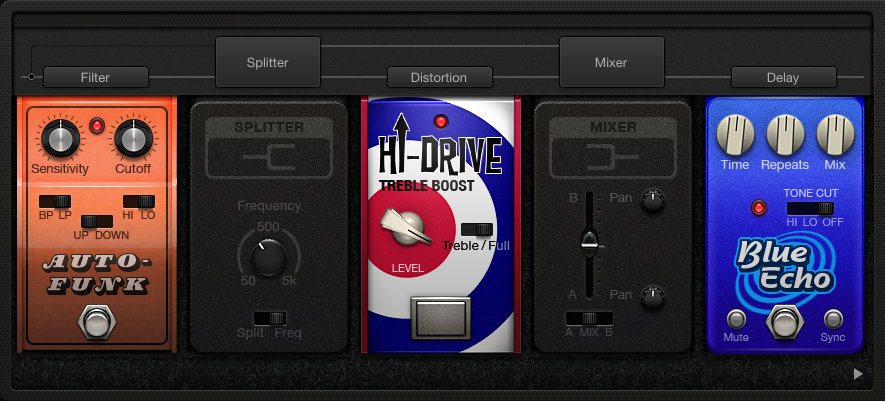
Pedalboard includes two utilities to control signal routing:
The Splitter splits the signal between Bus A and Bus B, either equally (in Split mode) or at a specific frequency (in Freq mode). In Freq mode, signals above the frequency set with the Frequency knob are routed to Bus B, while signals below the frequency are routed to Bus A.
The Mixer controls the level relationship between Bus A and Bus B signals. It can be inserted anywhere in the signal chain but is typically used at the end of the chain—at the extreme right of the Pedal area. The A/Mix/B switch solos the “A” signal, mixes the “A” and “B” signals, or solos the “B” signal. The level setting of the Mix fader is relevant for all A/Mix/B switch positions. The Mixer also provides discrete Pan controls for each bus.
You can drag a Splitter before or between pedals, but not after the last pedal. When you drag a Splitter into the Pedal area, a Mixer is added automatically after the last (rightmost) pedal. If you remove (drag out) the Mixer, the Splitter is removed as well.
You can drag a Mixer between pedals or after the last pedal, but not before the first (leftmost) pedal. When you drag a Mixer into the Pedal area, a split point is added before the first pedal. You can move the split point by clicking one of the gray circles between pedals on Bus A.
Move the pointer above the Pedal area to open the Router, then click the name of a pedal in the Router.
The clicked pedal is routed to Bus B, and a Mixer utility pedal appears to the right of the last pedal in the Pedal area.
To re-route the pedal to Bus A, click the name of the pedal in the Router again.
Drag a Splitter into the Pedal area when more than one pedal is inserted.
To replace a bus split point with a Splitter utility: Double-click the bus split point dot in the Router.
The Splitter utility appears in the Pedal area.
To replace a Splitter utility with a bus split point: Double-click the Splitter label in the Router.
The Splitter utility is removed from the Pedal area.
Drag the Mixer to a new position, either left or right.
If you move the Mixer to the left, the “downmix” of Bus A and Bus B occurs at the earlier insertion point. Relevant effect pedals are moved to the right and are inserted into Bus A.
If you move the Mixer to the right, the “downmix” of Bus A and Bus B occurs at the later insertion point. Relevant effect pedals are moved to the left and are inserted into Bus A.
Note: A Mixer can’t be moved directly before or after a split point or a Splitter.
Drag the Splitter to a new position, either left or right.
If you move the Splitter to the left, the split between Bus A and Bus B occurs at the earlier insertion point. Relevant effect pedals are moved to the right and are inserted into Bus A.
If you move the Splitter to the right, the split between Bus A and Bus B occurs at the later insertion point. Relevant effect pedals are moved to the left and are inserted into Bus A.
Note: A Splitter can’t be moved to a position directly preceding (or to the right of) a corresponding Mixer utility.