
You can tune guitars and other instruments with the Tuner, so that your audio recordings are in tune with the software instruments and existing recordings in your projects.
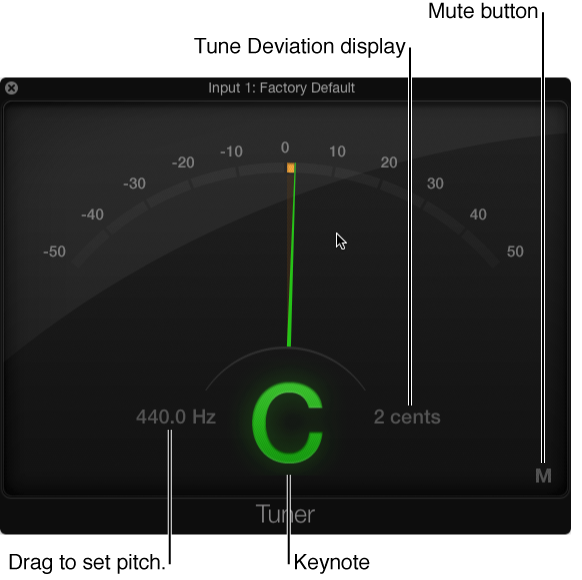
The Tuner contains the following parameters:
Graphic Tuning display: Shows the pitch of the note in cents. When the needle is centered in the display, the note is in tune. When the needle is left of center, the note is flat; when the needle is right of center, the note is sharp. Also, the needle and note name appear green when the note is in tune, and appear orange when it is flat or sharp.
Reference Tuning field: Drag vertically to set the reference pitch used as the basis for tuning. The default is for note A at 440 Hz, and can be set in 0.1 Hz steps in the range from 410 to 470 .
Keynote display: Shows the target pitch of the note being played (the closest tuned pitch).
Tune Deviation display: Shows the tuning deviation in cents.
Mute button: Click to mute.
Make sure the audio track for your guitar or other instrument is selected in the Tracks area.
Click the Tuner button  in the control bar.
Play a single note on the instrument and watch the Graphic Tuning and Keynote displays. If the note is flat or sharp of the keynote, orange segments are shown in the Graphic Tuning display. The Keynote is shown in orange, and the Tune Deviation display indicates how far (in cents) the note is off pitch.
Adjust the tuning of your instrument until the indicator is centered in the Graphic Tuning display and the Tune Deviation field shows zero (0 cents).
The Graphic Tuning display and Keynote are shown in green when the instruments are correctly tuned.