
The effects settings include reverb, tremolo, and vibrato, which emulate the processors found on many amplifiers. These controls are found in the center of the knobs section.
Note: The Effects section is placed before the Presence and Master controls in the signal flow, and receives the pre-amplified, pre-Master signal.
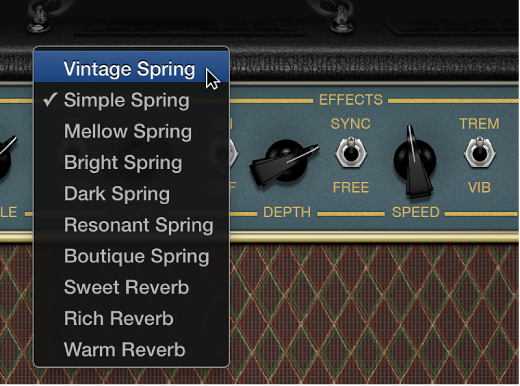
Reverb is always available in Amp Designer, even for models based on an amplifier that doesn’t include reverb. Reverb is controlled by an On/Off switch and a Level knob. The Reverb pop-up menu is located above these controls. You can add Reverb to either the tremolo or vibrato effect, or use it independently.
To turn the reverb on or off: Click the Reverb On/Off switch.
To choose the reverb type: Click the word Reverb to open the pop-up menu, then choose the reverb type.
To adjust the amount of reverb: Rotate the Level knob.
You can select either Trem(olo), which modulates the amplitude or volume of the sound, or Vib(rato), which modulates the pitch. Tremolo and vibrato are controlled by several switches and knobs in the effects section. Tremolo modulates the amplitude or volume of the sound, and Vibrato modulates the pitch of the sound.
To turn the tremolo or vibrato effect on or off: Click the Effects On/Off switch.
To switch between tremolo and vibrato: Click the Trem(olo)/Vib(rato) switch.
To set the intensity of the modulation for tremolo or vibrato: Rotate the Depth knob.
To set the speed of the modulation: Rotate the Speed knob.
Lower settings produce a smooth, floating sound. Higher settings produce a rotor-like effect.
To synchronize the modulation speed with the project tempo: Click the Sync/Free switch.
When the Sync/Free switch is set to Free, you can use the Speed knob to set the modulation speed to different bar, beat, and note values (1/8, 1/16, and so on, including triplet and dotted-note values).