
The playhead is the vertical line showing the current playback position in the Tracks area and other time-based windows (such as the Audio Editor, Piano Roll Editor, and Score Editor).
The LCD (short for liquid crystal display), located in the center of the control bar, shows the current position of the playhead in one of two formats:
Beats (musical time): Shows measures, beats, and beat divisions.
Time (absolute time): Shows hours, minutes, seconds, and fractions of a second.
Click a position in the lower part of the ruler.
Do one of the following:
Click-hold any of the numbers in the Position display and drag vertically.
Double-click either display field, then enter a new position.
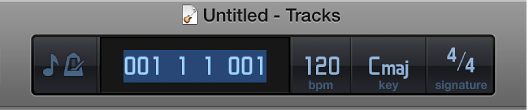
You can edit the individual divisions of the Position display by dragging, or edit the position as a whole by double-clicking and typing.
Click the icon on the left side of the LCD, then choose one of the following:
Beats and Project: Displays the time format in bars and beats, and displays the project tempo, key, and time signature.
Time: Displays the playhead position in absolute time format (hours, minutes, and seconds).