
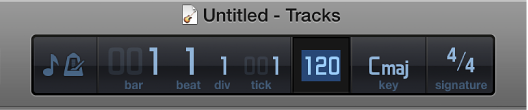
You can set the basic project tempo in the LCD. The tempo is displayed in beats per minute (bpm), ranging from 5 to 990 bpm. You can also tap the tempo using your computer keyboard. When you add Apple Loops to your project, they match the project tempo.
Click the icon on the left side of the LCD and choose Beats & Project, then do one of the following:
Click-hold the tempo value and drag up or down.
Double-click the tempo value, then enter a new value in the Tempo field.
You can also add tempo changes using the Tempo track. For information about the Tempo track, see Tempo track overview.