
The Audio Editor displays the audio waveform of the regions on an audio track. You can copy, paste, move, trim, split, and join audio regions. Using the Audio Editor grid, you can precisely align edits with specific points in time.
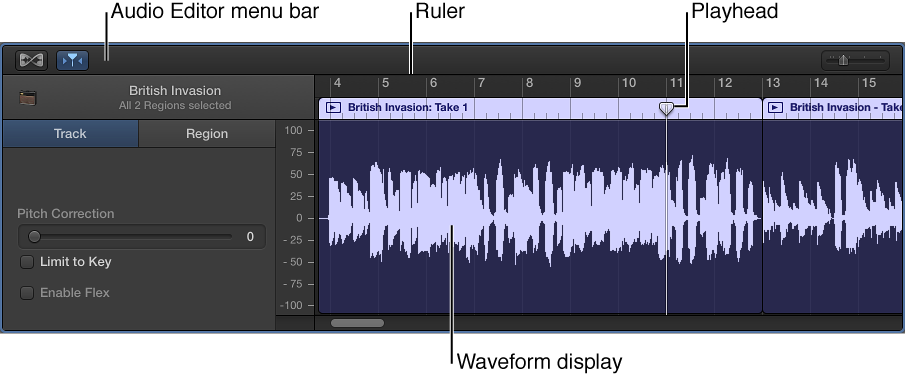
Audio Editor menu bar: Contains Flex and Catch buttons, and a zoom slider.
Audio Editor inspector: Contains controls for correcting pitch, quantizing time, and transposition.
Waveform display: Shows the audio waveform for the region on a time grid.
Ruler: Shows time divisions so you can align regions and make edits at precise time positions.
Playhead: Reflects the current playback position.
You can also edit individual notes and beats in the Audio Editor using Flex Time. All edits in the Audio Editor are nondestructive, so you can always return to your original recordings.
Do one of the following:
Double-click an audio region in the Tracks area.
Select an audio track, then click the Editors button  in the control bar.
Select an audio track, then choose View > Show Editors.
For more information about using the Audio Editor, see Audio Editor overview. For information about making Flex edits, see Edit the timing of notes and beats.