Reply to event or calendar invitations

You can reply to an event invitation or a shared calendar invitation in Calendar. You may also be able to reply via email or in a notification. If the invitation is for an event or a shared calendar in a calendar account that’s set up on your other devices, you can also reply to the event using any of those devices. If the invitation is for an event or a shared calendar in an iCloud account, you can also reply using iCloud Calendar on iCloud.com.

If you selected “Badge app icon” in Notifications preferences, the Calendar icon in the Dock has a red badge that shows the total number of invitations and other notifications you have for events and shared calendars.

Open Calendar for me

Reply to an invitation received in Calendar

  1. Click the Notifications button in the toolbar.

    The Notifications button shows how many invitations you have. If you don’t have any invitations, it isn’t available. A circled gray number next to a calendar name in the calendar list shows how many event notifications are pending for that calendar.

  2. Do one of the following:

    • For an event invitation: Click Accept, Decline, or Maybe.

    • For a shared calendar invitation: Click Join Calendar or Decline.

Reply to an event invitation received in Mail

Do one of the following:

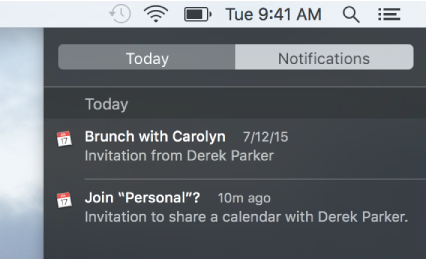
Reply to an invitation received in a Calendar notification

You can turn off all notifications for calendar events and shared calendars in Alerts preferences. You can change other notification options in Notifications preferences.

Note: For events in an iCloud calendar, you also receive an invitation in Mail, so you may see both a Calendar notification and a Mail notification.

If your declined events disappear from Calendar, and you want to see them again, choose View > Show Declined Events.

See also
Set event alerts and receive notifications
Add, modify, or delete events

Use Notification Center