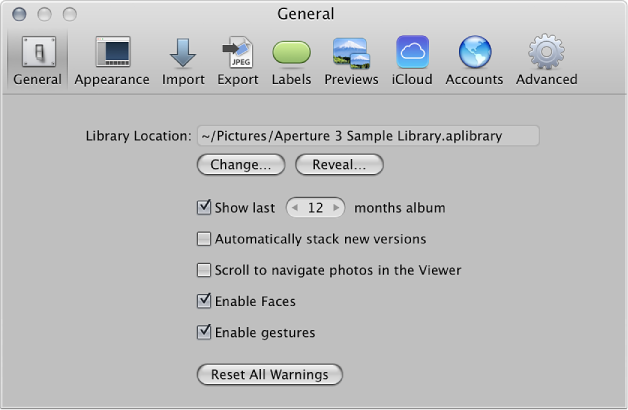

Use the controls in the General preference pane to set the location of the library, set the length of time to keep track of recently imported photos, enable face detection, automatically stack new versions of the same photo, and configure other photo management options.
The General preference pane contains the following controls:
Library Location field: Displays the default location of the library. To specify a custom location for the Aperture library, click Change and navigate to a location to store the library. Quit and reopen Aperture to complete the location change. Click Reveal to display the Aperture library file in the Finder.
“Show last [number] months album” checkbox: Select this checkbox to add an item to the Recent section of the Library inspector that tracks recently imported photos. Use the value slider to set the number of months to keep track of the imported photos.
“Automatically stack new versions” checkbox: Select this checkbox to automatically stack versions of the same photo as you create them.
“Scroll to navigate photos in the Viewer” checkbox: Select this checkbox to enable scrolling with the mouse when the pointer is placed over the photo in the Viewer (or in the Viewer mode in full-screen view).
Enable Faces checkbox: Select this checkbox to enable face detection when importing photos into the Aperture library.
“Enable gestures” checkbox: Select this checkbox to enable gesture functions in Aperture when using a Multi-Touch trackpad or Magic Mouse. For more information about the gesture functions supported in Aperture, see Use gestures with Aperture.
Reset All Warnings button: Click this button to display warning messages. If you have set Aperture to not display certain warnings, this button resets Aperture to display them again.