Move an item in the Library inspector
Select an item in the Library inspector, and drag it to a new location.
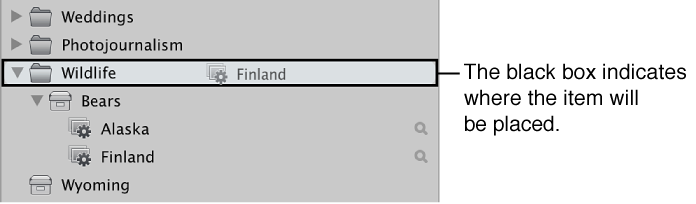
A black bar indicates where the item will be placed.

Typically, you create a new Aperture project for each photography project or job that you work on, regardless of its duration. For example, if you’re working on a documentary in Thailand, you would create a project for it. If you’re also shooting the temples in the interior of the country, that could be a second, separate project. Both projects could conceivably refer to some of the same photos, but they are completely independent structures, each with its own versions and albums.
Very large photography projects, such as documentaries and sporting events, often consist of large numbers of photos. You can always break one project into several should the need arise.
As your library grows, you may need to reorganize your library’s structure to fit your workflow. You can rearrange projects, folders, albums, and other items in the Library inspector.
Select an item in the Library inspector, and drag it to a new location.
A black bar indicates where the item will be placed.
Do one of the following:
Shift-click adjacent items, and drag them to a new location.
Command-click nonadjacent items, and drag them to a new location.
To group similar items together: Control-click in the Library inspector, and choose Keep Arranged By > Kind from the shortcut menu.
To sort items alphabetically: Control-click in the Library inspector, and choose Keep Arranged By > Name from the shortcut menu.